
Tennis Video Editor for Windows
August 12, 2026
Search for a tennis video editor and most of what comes back runs on a phone or in a browser tab. If your match footage is sitting on a Windows PC — pulled off a camcorder, a GoPro, or whatever your partner filmed on from the sideline — that isn’t much help.
The good news is that Windows is not short of video editors. The catch is what you’re actually asking them to do. Cutting tennis footage isn’t hard; finding the parts worth cutting is, and that’s the part no general-purpose editor does for you.
The short answer
| What you’re trying to do | What to use |
|---|---|
| Trim one or two clips | The editor you already have — Windows 11 ships with Clipchamp |
| Cut a whole session yourself | A free editor like DaVinci Resolve or Shotcut, plus an evening |
| Have the rallies found for you | Something that detects them — the rest of this page |
If you’re in the first row, you’re done. Go use it; it’s free and it’s already installed.
Why tennis is the awkward case
Point-to-point, the ball is genuinely in play for well under a quarter of a match. The rest is walking, towelling off, retrieving balls, arguing about whether it was out, and standing at the baseline bouncing one.
So a two-hour recording contains maybe twenty-five minutes of tennis, scattered across a hundred-odd rallies of eight to twenty seconds each. Nothing about that is hard to edit. It’s just that finding a hundred boundaries means watching the whole two hours with your finger on the scrub bar.
That’s the real job. Everything else about tennis editing is a solved problem.
The editors you already have will do it — by hand
Any of these will cut your match on Windows, and several cost nothing:
- Clipchamp — included with Windows 11, browser-based, fine for light trimming
- DaVinci Resolve — free, professional-grade, far more tool than this needs
- Shotcut — free, open source, no account required
- Premiere Pro — if you already pay for it
The workflow is the same in all of them: import the file, scrub, mark in, mark out, split, repeat, delete the gaps, export. For one clip that’s a couple of minutes’ work.
For a full session, do the arithmetic. A hundred rallies at even twenty seconds of marking each is over half an hour of clicking — and that’s on top of watching the two hours it takes to find them. Most people do this once, decide it wasn’t worth it, and never open the file again.
So why isn’t there an automatic one on Windows?
There are automatic tennis tools. They’re just mostly not on Windows.
SwingVision is the established one, and it’s a serious piece of software — automatic line calls, shot-by-shot statistics, coaching insight, live feedback while you play. It runs on iPhone, iPad, Apple Watch, and on Apple Silicon Macs. There is no native Windows version; the “SwingVision for Windows” downloads that turn up in search results are third-party wrappers, not something the company ships.
The rest of the automatic tools are phone apps or browser services. Both make sense as products — a phone is where the video is recorded, and a browser is the cheapest thing to build. Neither is where a Windows user’s 40 GB of match footage actually lives.
The sports-analysis software that does run on Windows is built for manual work — stepping through frames, drawing on the video, measuring angles. Useful software, and better at that job than anything here. It just doesn’t find rallies, because finding rallies isn’t what it’s for.
The gap isn’t “video editing on Windows.” It’s automatic rally detection on Windows.
What Rallytics does
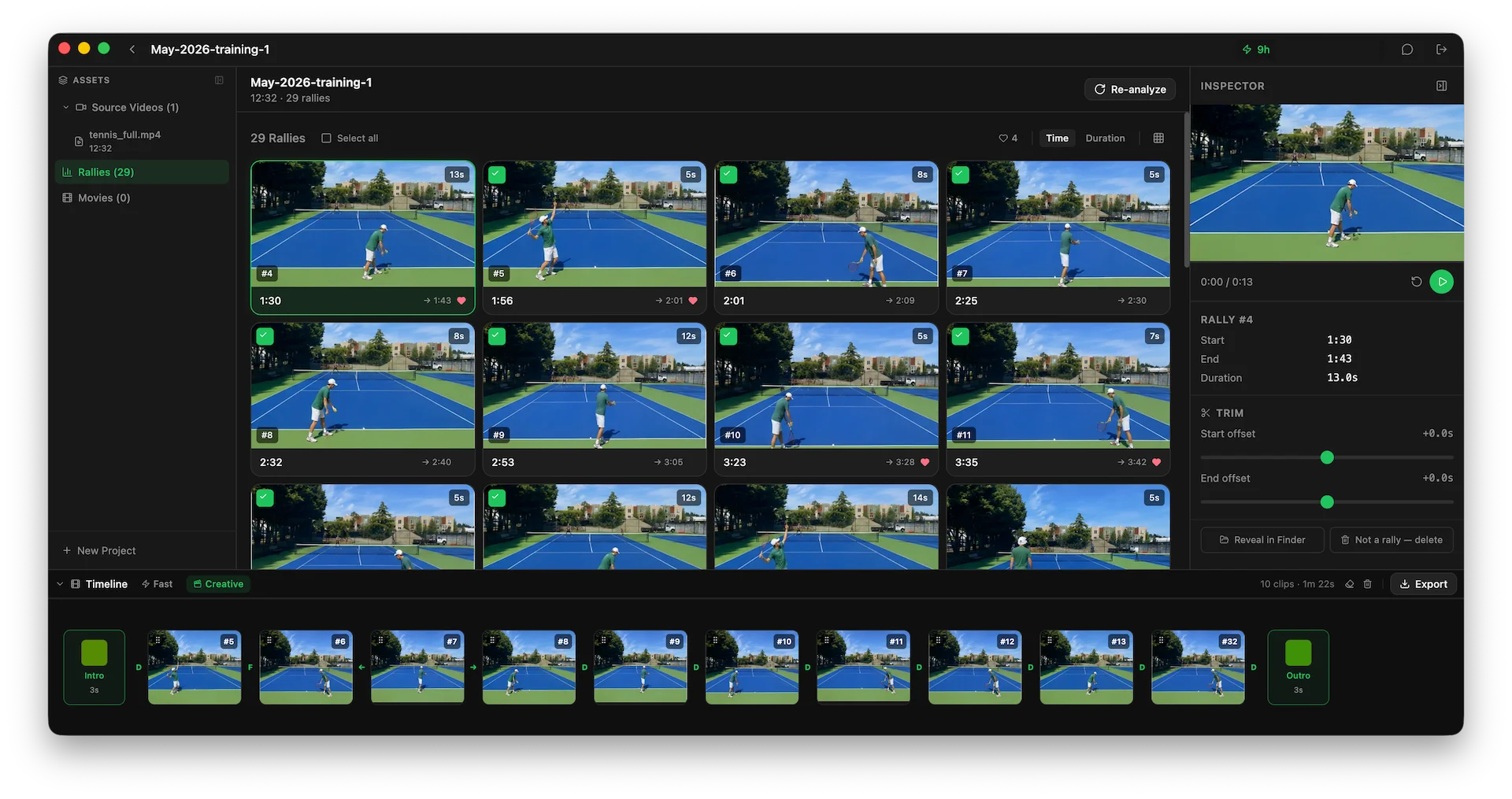
Rallytics is a desktop application for Windows and macOS built for exactly that one job: take a long recording, find the rallies, give you clips.
You point it at a video file already on your disk. It works through the file and comes back with the rallies as a grid of thumbnails, each with a start time, an end time and a duration.
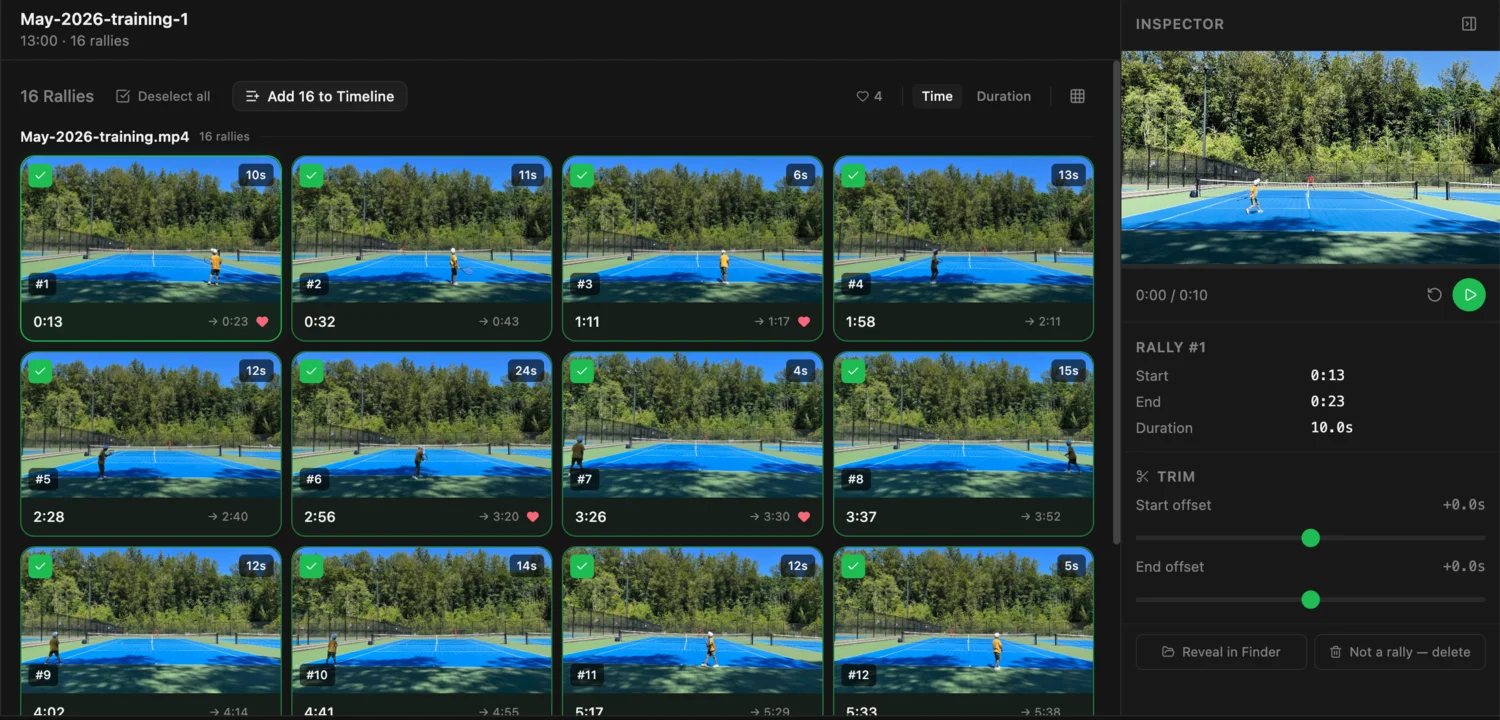
From there you review. Play a rally, nudge its start or end if the cut isn’t quite right, mark the ones worth keeping, and delete anything that wasn’t actually a rally — detection is good, not infallible, and fixing it is a click.
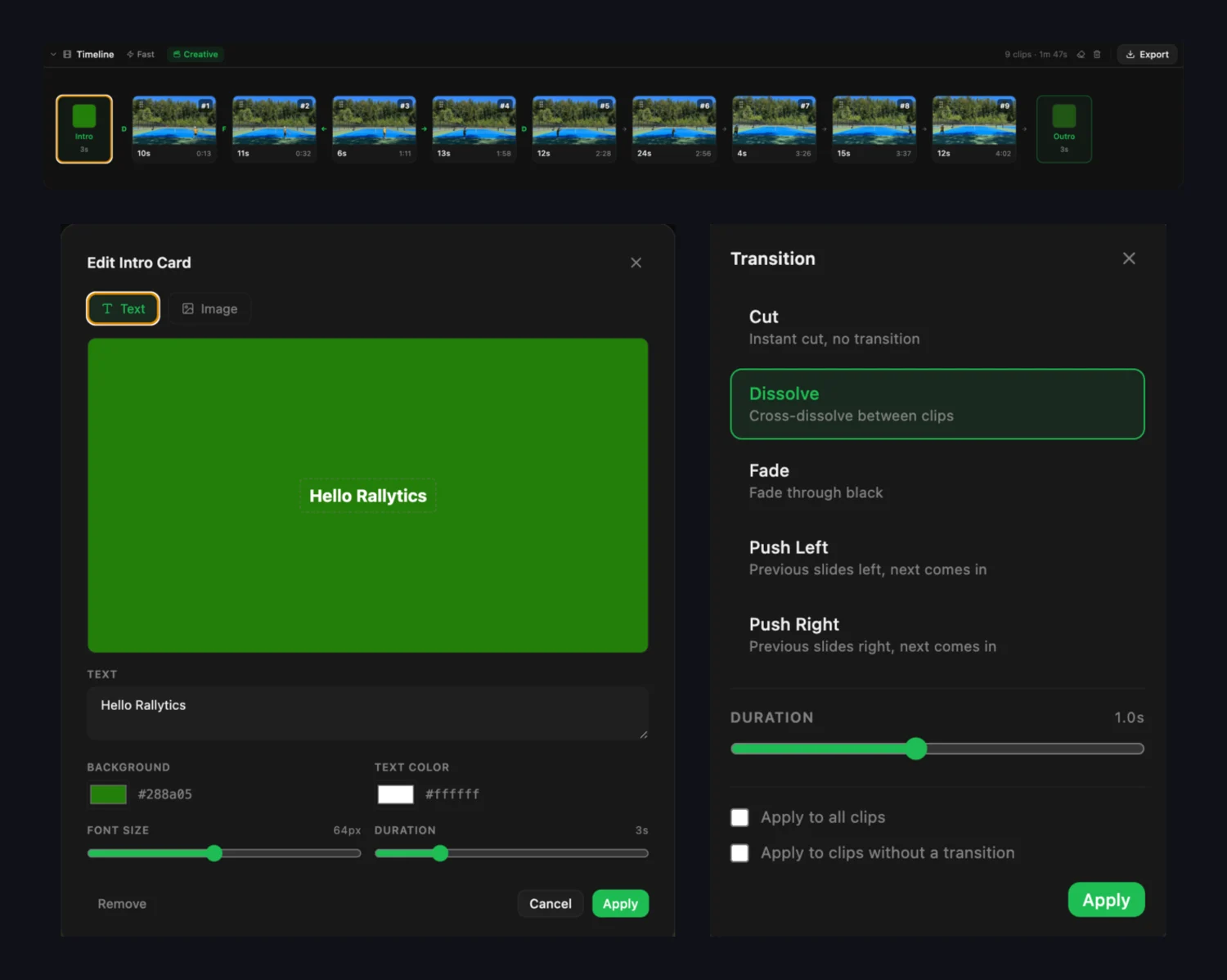
Then you drag the keepers into order and export a single MP4, optionally with an intro card, an outro and transitions between clips.
Four things about how it does that are worth knowing, because they’re the trade-offs:
Your original footage never leaves your computer. To find the rallies, Rallytics makes a small low-resolution copy locally and sends only that away for analysis. The original stays on your machine, and the actual cutting happens locally against the full-quality file. What goes out is a description of your video, not the video.
It isn’t fussy about how you filmed. There’s no required camera height or angle, because it isn’t measuring the court — it’s recognising what’s happening. Side-on, handheld, a phone wedged in the fence, a GoPro on a tripod: all tend to work. 4K is fine, and it isn’t reserved for a higher tier.
Your library stays on your disk. Originals, rallies and exports are ordinary files in ordinary folders. They don’t expire, they don’t depend on a subscription being current, and backing them up is whatever you already do to back up your PC. Tennis video is big and accumulates fast; a phone is not where a season should live.
There’s no subscription. You buy processing time when you need it: $4.99 covers three hours, $11.99 covers eight, and an Annual Pass at $89.99 — one payment, no auto-renewal — releases eight hours a month for a year.
A note on disk space
This matters more on a PC than it does on a phone, because on a PC you actually keep things. An hour of 4K match footage runs to several gigabytes, and a season of it is the sort of thing that fills a drive quietly.
When you add a video, Rallytics asks how you want it handled:
- Copy to project folder — makes its own copy, so you’re free to move or delete the original afterwards.
- Reference original — leaves the file where it is and points at it. No second copy, no extra disk used.
If your footage already lives somewhere sensible — an external drive, a NAS share, a folder you back up — reference it and skip the duplication entirely. The exports you create are new files either way, and they’re small: a highlight reel is only the tennis.
Getting started on Windows
- Install it. Rallytics is on the Microsoft Store — Windows 10 or later, 64-bit. The download is free and it updates through the Store.
- Point it at a file. An MP4 from a phone, a GoPro, a camcorder, or something you exported from another editor.
- Analyse. New accounts include two hours of analysis, no card required — enough for a full session to see whether the results are worth it.
- Review the rallies. Trim what needs trimming, mark the good ones, drop the false positives.
- Export the ones you want as a single highlight movie.
When this isn’t the right tool
Being direct about it:
- You want line calls, shot statistics and coaching. That’s a different product, and SwingVision does it well. You’ll need an Apple device.
- You want to pick your forehand apart in slow motion. Rallytics finds rallies and cuts them; it isn’t a frame-by-frame analysis tool, and a general editor will step frames better than it does.
- You have one clip to trim. Open Clipchamp. Don’t install software for that.
- You film most weeks. A subscription that includes tens of hours a month rewards heavy use, and a pay-as-you-go tool that pays for AI processing on every analysis can’t match it at volume.
Rallytics is for the case in between: you’ve got hours of footage on a PC, you want the tennis out of it, and you don’t want to spend an evening scrubbing.
Common questions
Does it work on Windows 10? Yes — Windows 10 or later, 64-bit. There’s a Mac version too, for Apple Silicon.
Do I have to upload my match? Not the match itself. A small low-resolution copy is sent for analysis; the original file stays on your computer and all cutting and exporting happens locally against it.
What files does it take? Standard video files — MP4 from phones, action cameras and camcorders. 4K is supported.
Does the camera have to be in a particular place? No. There’s no required angle or height. Anything where a person watching could tell what’s going on tends to work.
Is there a free version? New accounts get two hours of analysis, no card required. After that you buy processing time in packs — there’s no subscription and nothing renews on its own.
Do I need to be online? For analysis, yes. Reviewing rallies, trimming and exporting are local.
Try it on your own footage
The honest test is your own video, not a demo. Install it, point it at your longest recording, and see what comes back — the two included hours cover a full session.
Download Rallytics for Windows
On a Mac as well? There’s a Mac version of this guide. Coming from another app? See the SwingVision comparison.